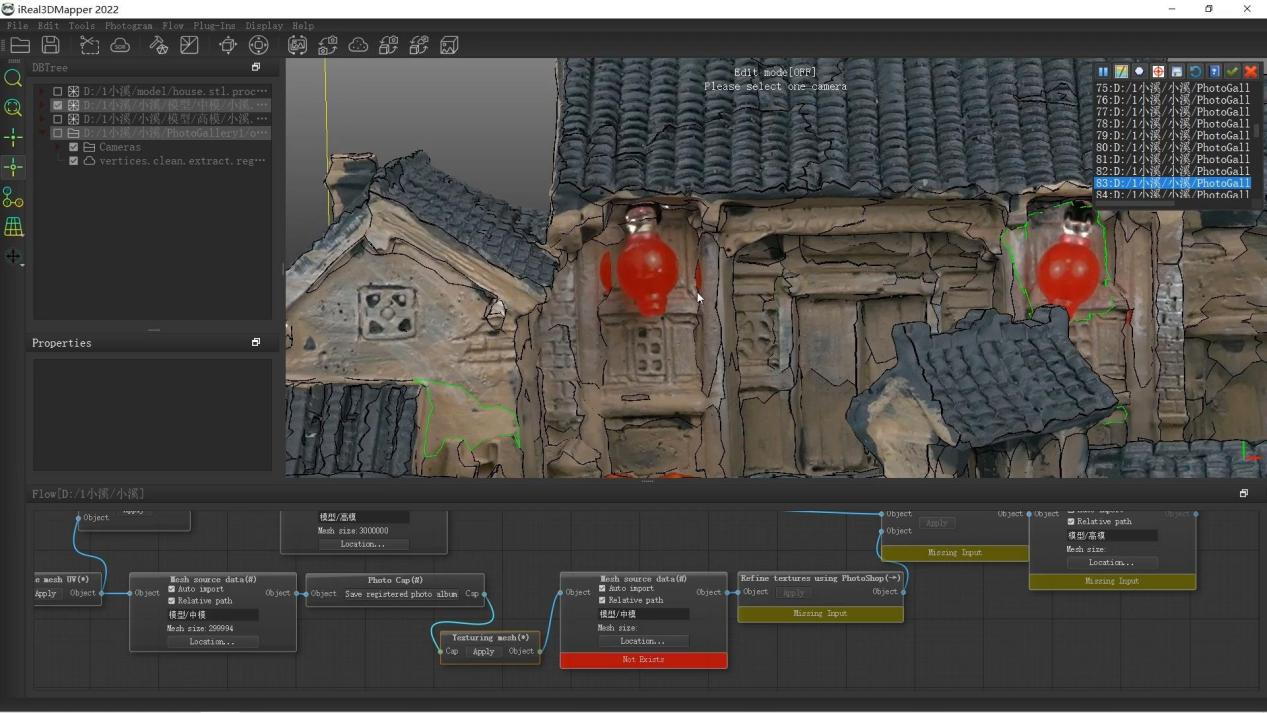
The process of 3D texturing changes a colorless, mathematically accurate geometric model into a digital asset that looks real and is convincing. It is the most important link between the raw dimensional data that a scanner collects and the final, usable 3D model that is needed for everything from movies to preserving culture. A 3D scanner gives you the basic surface geometry, which is a huge list of coordinate points. However, it is the dedicated 3D mapping software that does the hard, multi-step job of putting color, texture, and material properties onto that structure. This complicated process needs special tools. Platforms like the 3DeVOK ecosystem give you the strong framework you need to handle high-resolution data and get archival-grade visual fidelity. Effective 3D texturing goes beyond just capturing color. It is a smart, software-driven process that combines geometry and photographic detail into one digital representation that makes sense.
Using 3D mapping software to build the geometric base
Before any texturing can happen, the 3D mapping software has to carefully set up the underlying geometric structure. The first output from the scanner is a “point cloud” made up of millions of separate spatial points. This is then turned into a continuous polygon mesh. This meshing process uses smart triangulation to connect points that are close together to make the object’s digital surface.
There are a few important steps in the preparation phase that help with optimization. First, automated hole filling and smoothing fix areas where there is missing data or surface noise. Precise registration is important for objects that need to be scanned multiple times, which is common for large or complicated artifacts. Using geometric features, physical markers, and texture details as reference points, 3DeVOK’s Hybrid Alignment technology seamlessly stitches together scan segments. Lastly, controlled decimation keeps the shape of the polygons while lowering the number of them. High resolution makes sure that things are accurate, but very dense meshes make it hard for applications that come after them to work. This strategic simplification keeps the models looking good while making them light enough to work in real-time settings like VR and game engines.
The Main Texturing Process and Replacing Texture Mapping
The most important part of the process is the texture application, which requires the special features of 3D texturing software. In essence, texture mapping is the math that takes a 2D image (the color and detail information) and puts it on the 3D surface of the finished mesh. This starts with UV Unwrapping, which is like cutting and flattening the surface of a globe onto a flat map. It “unfolds” the 3D surface into a 2D plane. After this UV map is made, the color data, called the texture map, can be put on top of it correctly.
Some scanners can get basic color data at the same time as geometry, but this texture is often low-resolution or messed up by lighting problems that are common in the scanning environment. Texture Mapping Replacement is a technique that uses high-quality photography from outside sources to add to or replace the color data that was captured. This is done to get professional, photorealistic results. This is when you really need specialized tools like 3DeVOK Mapping Software and the BesTexture Plug-in. The workflow is very technical. The 3D texturing software takes high-resolution pictures, usually from a DSLR camera, and then uses the correct geometry as a reference to mathematically project them onto the mesh. The software smartly fixes problems caused by things outside of its control, like lens distortion, differences in lighting between photos, and small misalignments between the camera positions and the geometric mesh. The scanner gives the micron-accurate shape, and the high-end photography gives DSLR-quality visual detail. This creates an unmatched level of realism that is necessary for preserving cultural heritage and marketing visualization.
Improvement, optimization, and final output
The last step in the 3D texturing process is to make the texture better and get it ready for the target application. Even after projection, textures often need some fine-tuning, like fixing colors, editing seams, and smoothing out light transitions to get rid of any visual stitching artifacts where the edges of the photos meet.
The 3D texturing software has the tools to fix these small problems, making sure that the final asset looks perfect and uniform.
Precision Texturing for Professional Results
The texture data must be put into a format that can be sent out, which is very important. The software makes the final texture maps and packs them into the UV layout in a way that saves space. The 3DeVOK platform can handle a variety of output formats, including standard ones like OBJ and STL. This makes it easy to move the digital asset to other programs that are specific to the industry, like a CAD suite for dimensional analysis or a game engine for interactive display. The software keeps the highest resolution texture for archiving purposes, but for real-time viewing, it adjusts the texture map’s resolution to find a good balance between visual quality and frame rate performance. The main goal of this last step, which is guided by the powerful features of the 3D Mapping Software, is to make sure that the mesh is perfectly shaped and that the surface looks just as good as the mesh. This will finish the process of turning a physical object into a fully professional digital twin that can be used in any professional setting.